Advanced usage
Enable vTPM for your instances
You can enable a virtual Trusted Platform Module (vTPM) for your instances by configuring image's metadata. Two TPM versions are supported (1.2 and 2.0), as well as two models: TPM Interface Specification (TIS) and Command-Response Buffer (CRB). Note that the CRB model is only supported with version 2.0.
Note
In order to edit the image's metadata, you must own the image. This requires that you build or upload your own images to the public cloud in order to be able to set the vTPM metadata.
Limitations and impacts
An instance with a vTPM is tightly bound to the compute node it runs on: its TPM state cannot be moved or recreated elsewhere, and live migrations are not possible. The following operations are therefore not supported for instances with a vTPM (see Instance lifecycle and rescue):
| Operation | Command | Consequence |
|---|---|---|
| Rebuild | openstack server rebuild |
The instance cannot be reset from a new image |
| Rescue | openstack server rescue |
The instance cannot be booted into a rescue environment |
| Shelve / Unshelve | openstack server shelve / openstack server unshelve |
The instance resources cannot be released while keeping its state |
| Evacuate | openstack server evacuate |
If the physical host fails, the instance cannot be moved to another host |
Warning
Because of these restrictions, only you can act on the server: Infomaniak cannot perform administrative operations on it on your behalf. For example, if a maintenance operation on the physical host requires a restart, you are responsible for rebooting the instance yourself (through the OpenStack CLI, the Horizon dashboard or from inside the operating system). Likewise, if the physical host encounters an incident, the instance remains unavailable until the host is restored, as it cannot be evacuated. Plan for redundancy if your workload requires high availability.
Image Metadata Properties
| Image Metadata Key | Description |
|---|---|
| hw_tpm_version | Specify the TPM version, 1.2 or 2.0. This is required to request a vTPM. |
| hw_tpm_model | Specify the TPM model, tpm-tis (default) or tpm-crb (only valid with version 2.0). |
Example: Configuring an Image to Use TPM 2.0 with the CRB Model
To configure an image for TPM 2.0 and the CRB model:
❯ openstack image set <image-id> \
  --property hw_tpm_version=2.0 \
  --property hw_tpm_model=tpm-crb
Replace <image-id> with the ID of your image.
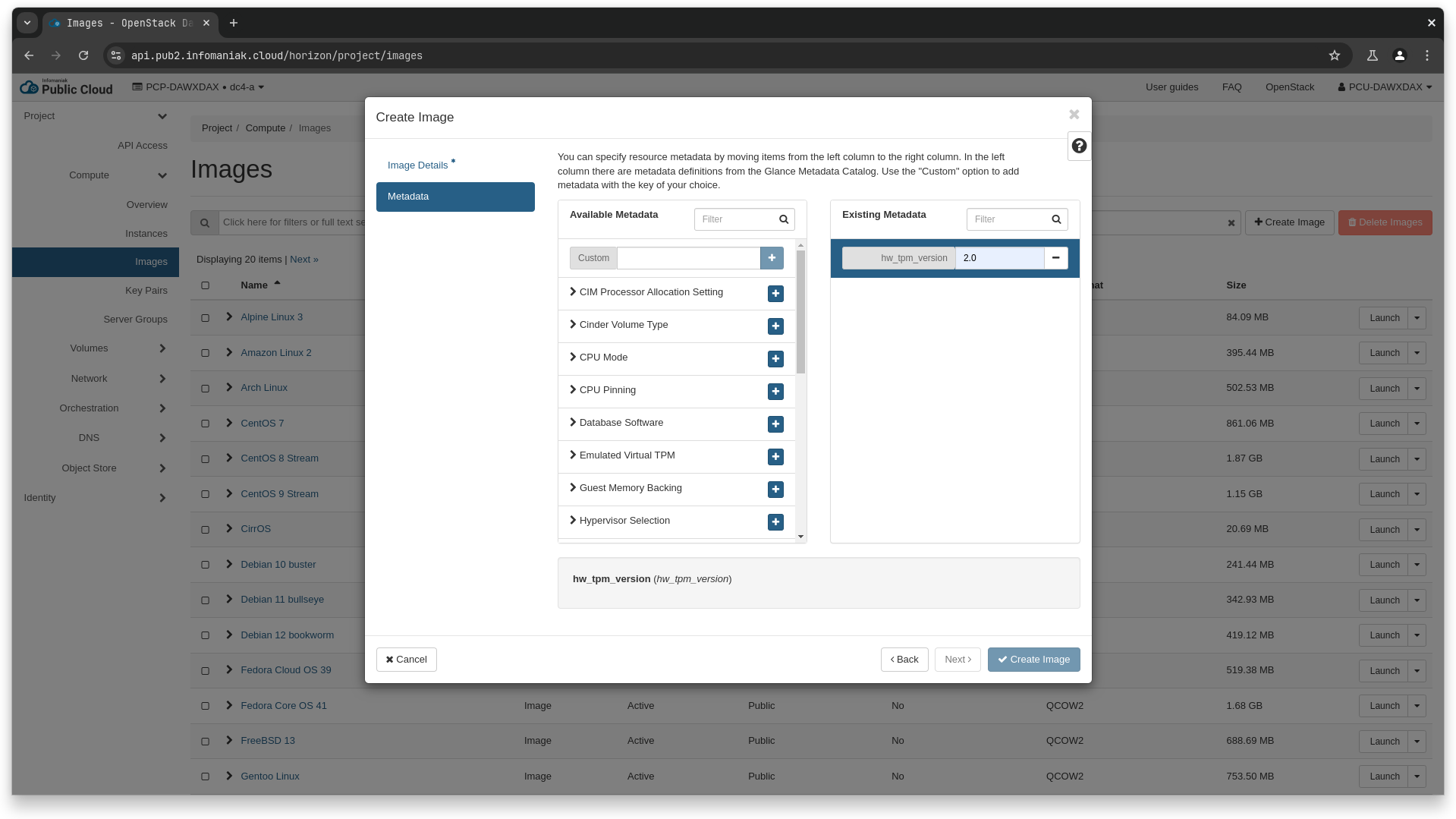
Warning
When using Horizon, the hw_tpm_model property does not accept arbitrary values. You must choose between CRB and TIS.
resource "openstack_images_image_v2" "ubuntu_noble_tpm" {
  name             = "Ubuntu 24.04 - Noble Numbat (vTPM)"
  image_source_url = "https://cloud-images.ubuntu.com/noble/current/noble-server-cloudimg-amd64.img"
  container_format = "bare"
  disk_format      = "qcow2"

  properties = {
    hw_tpm_version = "2.0"
    hw_tpm_model   = "tpm-crb"
  }
}
Warning
Model Limitations: The tpm-crb model can only be used with TPM version 2.0. Setting this model with version 1.2 will cause an error. Image Configuration: Ensure that the image metadata does not specify conflicting values. For example, you cannot set both hw_tpm_version=1.2 and hw_tpm_version=2.0 on the same image.
Verification
Upon successful boot, the instance should have access to a TPM device (e.g., /dev/tpm0), which can be used as a hardware TPM would.
This setup ensures your instances leverage the enhanced security benefits of a virtual TPM.