Security Groups (Firewall)
A security group acts as a virtual firewall for servers and other resources on a network.
By default, when creating a VM, a default security group is created meaning all the outgoing traffic is authorised while all incoming traffic is blocked.
You can add rules to this default security group or create new ones following this guide.
Creating a security group
When creating a new security group all the outgoing traffic is authorised while all incoming traffic is blocked.
$ openstack security group create taylor
+-----------------+-------------------------------------------------------------------------------------------------------------------------------------------------------+
| Field           | Value                                                                                                                                                 |
+-----------------+-------------------------------------------------------------------------------------------------------------------------------------------------------+
| created_at      | 2021-02-25T07:50:03Z                                                                                                                                  |
| description     | taylor                                                                                                                                                |
| id              | d2446c3f-66bf-41c7-831e-270e0533b911                                                                                                                  |
| name            | taylor                                                                                                                                                |
| project_id      | ac4fafd60021431585bbb23470119557                                                                                                                      |
| revision_number | 1                                                                                                                                                     |
| rules           | created_at='2021-02-25T07:50:03Z', direction='egress', ethertype='IPv4', id='46b6de17-f31f-4830-8656-a96980cdd974', updated_at='2021-02-25T07:50:03Z' |
|                 | created_at='2021-02-25T07:50:03Z', direction='egress', ethertype='IPv6', id='eb6e97d7-c147-4153-9f43-7605ebb6dfb4', updated_at='2021-02-25T07:50:03Z' |
| stateful        | True                                                                                                                                                  |
| tags            | []                                                                                                                                                    |
| updated_at      | 2021-02-25T07:50:03Z                                                                                                                                  |
+-----------------+-------------------------------------------------------------------------------------------------------------------------------------------------------+
You can see the 2 rules allowing all outgoing traffic (IPv4 + IPv6)
Authorising incoming SSH connection (port 22)
$ openstack security group rule create --ingress --protocol tcp --dst-port 22 --ethertype IPv4 taylor
+-------------------+--------------------------------------+
| Field             | Value                                |
+-------------------+--------------------------------------+
| created_at        | 2021-02-25T07:53:45Z                 |
| description       |                                      |
| direction         | ingress                              |
| ether_type        | IPv4                                 |
| id                | ea010467-2170-4f13-80a3-8162ddd99a03 |
| name              | None                                 |
| port_range_max    | 22                                   |
| port_range_min    | 22                                   |
| project_id        | ac4fafd60021431585bbb23470119557     |
| protocol          | tcp                                  |
| remote_group_id   | None                                 |
| remote_ip_prefix  | 0.0.0.0/0                            |
| revision_number   | 0                                    |
| security_group_id | c901c534-fd90-4738-aa6b-007cd7a5081b |
| tags              | []                                   |
| updated_at        | 2021-02-25T07:53:45Z                 |
+-------------------+--------------------------------------+
List the security group rules
$ openstack security group rule list taylor
+--------------------------------------+-------------+-----------+-----------+------------+-----------+-----------------------+
| ID                                   | IP Protocol | Ethertype | IP Range  | Port Range | Direction | Remote Security Group |
+--------------------------------------+-------------+-----------+-----------+------------+-----------+-----------------------+
| 327f0ba7-98e9-4967-8bbf-7089ac7d6184 | None        | IPv4      | 0.0.0.0/0 |            | egress    | None                  |
| c621e178-4ad6-4dea-9acc-2d2b7e4cbf27 | None        | IPv6      | ::/0      |            | egress    | None                  |
| ea010467-2170-4f13-80a3-8162ddd99a03 | tcp         | IPv4      | 0.0.0.0/0 | 22:22      | ingress   | None                  |
+--------------------------------------+-------------+-----------+-----------+------------+-----------+-----------------------+
Warning
Rules ordering doesn't actually reflect rules priority.
Apply a security group to your VM
Security group = taylor
VM name = infomaniak-vm-1
openstack server add security group infomaniak-vm-1 taylor
let's confirm the group is applied
$ openstack server show infomaniak-vm-1
+-----------------------------+------------------------------------------------------------------------+
| Field                       | Value                                                                  |
+-----------------------------+------------------------------------------------------------------------+
| OS-DCF:diskConfig           | MANUAL                                                                 |
| OS-EXT-AZ:availability_zone | b10                                                                    |
| OS-EXT-STS:power_state      | Running                                                                |
| OS-EXT-STS:task_state       | None                                                                   |
| OS-EXT-STS:vm_state         | active                                                                 |
| OS-SRV-USG:launched_at      | 2021-02-24T15:51:27.000000                                             |
| OS-SRV-USG:terminated_at    | None                                                                   |
| accessIPv4                  |                                                                        |
| accessIPv6                  |                                                                        |
| addresses                   | ext-net1=2001:1600:115:1::3d8, 195.15.241.27                           |
| config_drive                |                                                                        |
| created                     | 2021-02-24T15:51:17Z                                                   |
| flavor                      | cpu2-ram6-disk20 (2655c1e3-a43a-4dea-a957-650517e8fa72)                |
| hostId                      | 1baedae8de146b81f259cfec3cf33fcae980bb274f8fef46a5f49ba9               |
| id                          | 5bf0ebf6-825d-4879-b4b8-90245ec4dc19                                   |
| image                       | Debian 10.10 buster                                                    |
| key_name                    | mykeypair                                                              |
| name                        | infomaniak-vm-1                                                        |
| progress                    | 0                                                                      |
| project_id                  | ac4fafd60021431585bbb23470119557                                       |
| properties                  |                                                                        |
| security_groups             | name='default'                                                         |
|                             | name='taylor'                                                          |
| status                      | ACTIVE                                                                 |
| updated                     | 2021-02-24T15:51:27Z                                                   |
| user_id                     | b1580497f51e4d10b9110c60c154562c                                       |
| volumes_attached            |                                                                        |
+-----------------------------+------------------------------------------------------------------------+
We see above that there are 2 security groups: default and taylor, therefore both rules apply. For example if rule1 allows port 21 and 22, and rule2 allows port 21, ports 21 and 22 will be open. if rule1 allows port 21 and rule2 port 22 then ports 21 and 22 will be open too.
Remote security groups
When a security group rule specifies a remote group, for example a ingress rule in sgA specifies a remote group of sgB, that means only packets from VMs using sgB could match this ingress rule.
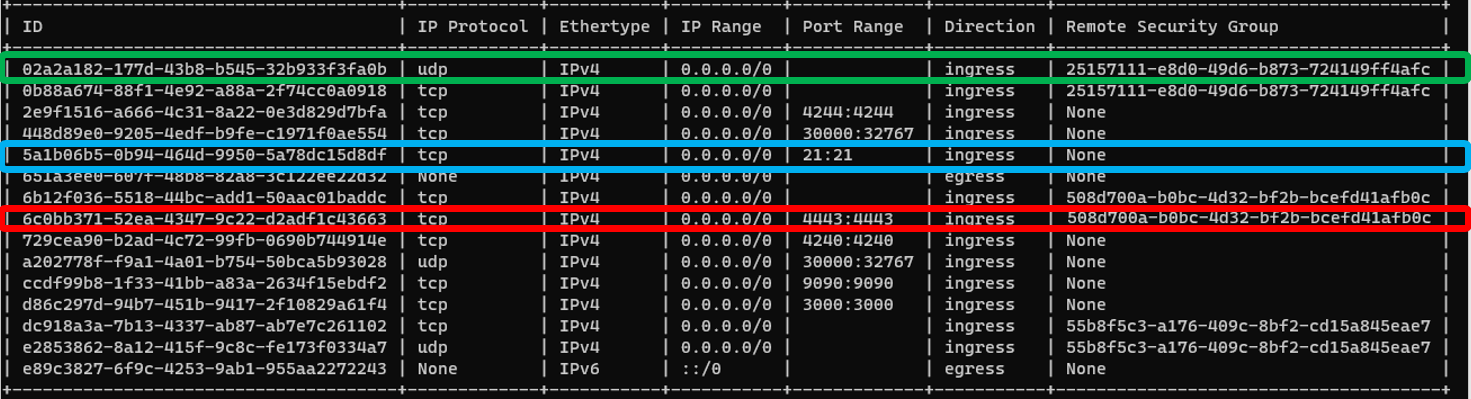
Green = Ingress IPv4 traffic to all UDP ports is allowed for VMs using the security group 25157111-e8d0-49d6-b873-724149ff4afc (VMs source IP)
Blue = Ingress IPv4 traffic to TCP port 21 is allowed regardless the source IP.
Red = Ingress IPv4 traffic to TCP port 4443 is ONLY allowed for VMs using the security group 508d700a-b0bc-4d32-bf2b-bcefd41afb0c (VMs source IP)
Default security group
By default, when creating your project, certain ports are blocked:
- Port 25 is blocked for outgoing traffic.
You can modify these rules if necessary.
Infomaniak Public Cloud IP Ranges
When configuring security group rules, you may need to know the public IP ranges used by Infomaniak Public Cloud infrastructure.
Infomaniak publishes an up-to-date JSON file containing all public IP ranges (IPv4 and IPv6) for its services, including Public Cloud:
JSON file: https://prefixes.infomaniak.com/json
This file is useful for:
- Configuring firewall rules
- Setting up IP whitelisting
- Filtering access to your resources
IP Range Format
IP addresses are provided in CIDR notation (e.g., 192.0.2.0/24), which represents a range of consecutive addresses.
More Details
For comprehensive information about using IP ranges, see the IP Ranges documentation.