Quotas and Accounting
Each project has defined quota limits that determine the maximum amount of cloud resources it can use. These quotas apply to resources such as compute instances, volumes, networks, and snapshots, and are grouped in quota packs (level 1, 2 or 3) depending on your offer.
Infomaniak Manager Horizon Dashboard Billing, Metering and Rating
View your quotas
openstack quota show --fit
Example output for a level 1 project
+------------------------+-------+
| Resource               | Limit |
+------------------------+-------+
| cores                  |    20 |
| instances              |    10 |
| ram                    | 65536 |
| fixed_ips              |  None |
| networks               |    10 |
| volumes                |    20 |
| snapshots              |    40 |
| gigabytes              |  1000 |
| backups                |    40 |
| volumes_CEPH_1         |    -1 |
| gigabytes_CEPH_1       |    -1 |
| snapshots_CEPH_1       |    -1 |
| volumes_CEPH_1_perf4   |    -1 |
| gigabytes_CEPH_1_perf4 |    -1 |
| snapshots_CEPH_1_perf4 |    -1 |
| volumes_CEPH_1_perf3   |    -1 |
| gigabytes_CEPH_1_perf3 |    -1 |
| snapshots_CEPH_1_perf3 |    -1 |
| volumes_CEPH_1_perf2   |    -1 |
| gigabytes_CEPH_1_perf2 |    -1 |
| snapshots_CEPH_1_perf2 |    -1 |
| volumes_CEPH_1_perf1   |    -1 |
| gigabytes_CEPH_1_perf1 |    -1 |
| snapshots_CEPH_1_perf1 |    -1 |
| groups                 |    10 |
| trunk                  |    -1 |
| check_limit            |  None |
| health_monitors        |  None |
| listeners              |  None |
| load_balancers         |  None |
| l7_policies            |  None |
| pools                  |  None |
| ports                  |    20 |
| project_id             |  None |
| rbac_policies          |    10 |
| routers                |    10 |
| subnets                |    10 |
| subnet_pools           |    -1 |
| injected-file-size     | 10240 |
| injected-path-size     |   255 |
| injected-files         |     5 |
| key-pairs              |    10 |
| properties             |   128 |
| server-group-members   |   100 |
| server-groups          |    10 |
| floating-ips           |    10 |
| secgroup-rules         |   100 |
| secgroups              |    10 |
| backup-gigabytes       |  1000 |
| per-volume-gigabytes   |    -1 |
+------------------------+-------+
For the Object Storage quota (in bytes) use the command:
openstack object store account show
+------------+---------------------------------------+
| Field      | Value                                 |
+------------+---------------------------------------+
| Account    | AUTH_fce31ac00731428ahstd06d5465ff1df |
| Bytes      | 0                                     |
| Containers | 0                                     |
| Objects    | 0                                     |
| properties | quota-bytes='1000000000000'           |
+------------+---------------------------------------+
Info
When displaying quotas, a value of -1 or none means unlimited.
You can view and change your quotas from your Infomaniak workspace.
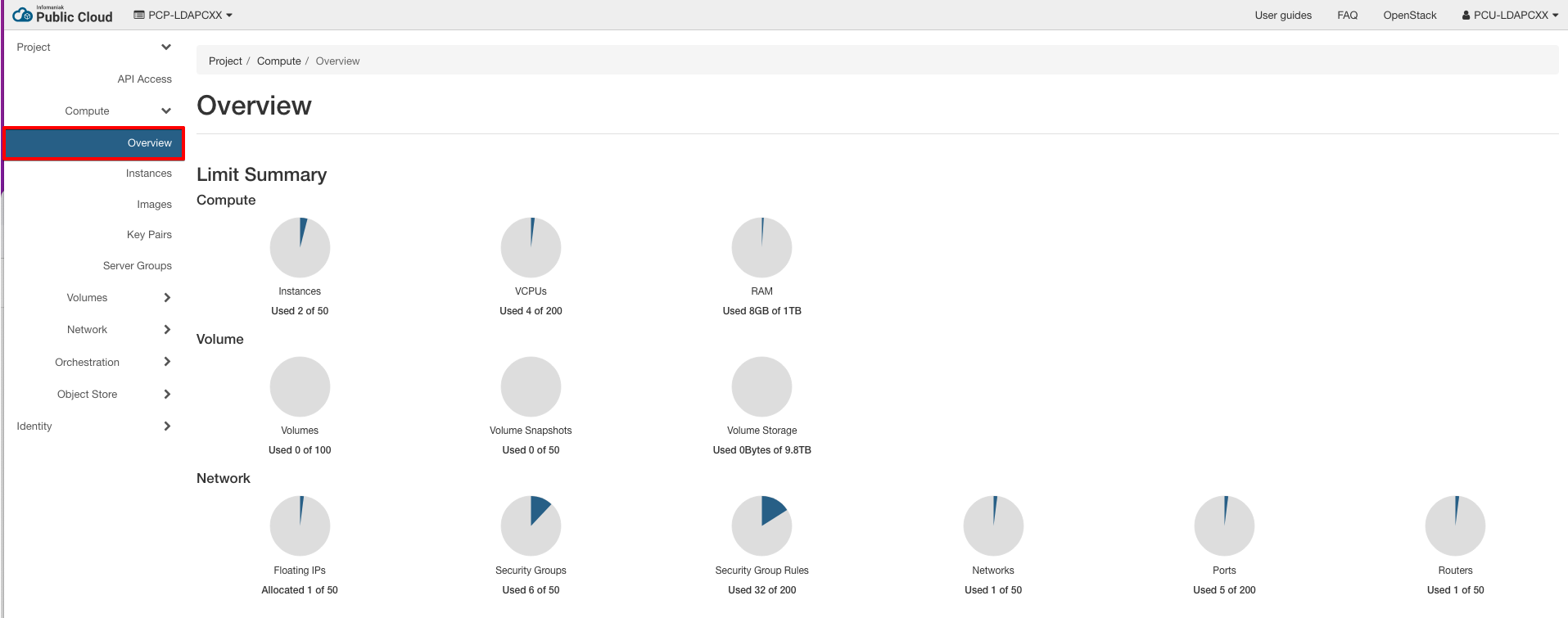
Quota packs
The following packs are applied per project, depending on your offer level. The values match the openstack quota show field names.
Tip
These packs cover most use cases. If your workloads require higher limits, contact Infomaniak support: quotas can be adjusted for specific needs.
Compute
| Quota | Level 1 | Level 2 | Level 3 | Description |
|---|---|---|---|---|
cores |
20 | 200 | 500 | Number of instance cores (vCPUs) allowed per project |
ram |
65536 | 1048576 | 2097152 | Total megabytes of instance RAM allowed per project |
instances |
10 | 50 | 200 | Number of virtual machines allowed per project |
key-pairs |
10 | 100 | 100 | Number of key pairs allowed per project |
server-groups |
10 | 50 | 100 | Number of server groups per project |
server-group-members |
100 | 100 | 200 | Number of servers per server group |
injected-files |
5 | 5 | 5 | Number of injected files allowed per project |
injected-file-size |
10240 | 10240 | 10240 | Content bytes allowed per injected file |
injected-path-size |
255 | 255 | 255 | Bytes allowed per injected file path |
properties |
128 | 128 | 128 | Metadata properties allowed per image or instance |
Block Storage
| Quota | Level 1 | Level 2 | Level 3 | Description |
|---|---|---|---|---|
volumes |
20 | 100 | 500 | Total volumes allowed per project |
gigabytes |
1000 | 10000 | 50000 | Total volume storage space in GB |
snapshots |
40 | 200 | 1000 | Total number of volume snapshots allowed per project |
backups |
40 | 200 | 1000 | Number of volume backups allowed per project |
backup-gigabytes |
1000 | 5000 | 50000 | Maximum size of backups in GB (sum of all backups) |
groups |
10 | 20 | 50 | Number of consistency groups allowed per project |
per-volume-gigabytes |
unlimited | unlimited | unlimited | Maximum size in GB of individual volumes |
volumes_CEPH_1_perf1 |
unlimited | unlimited | unlimited | Volumes allowed for this specific CEPH_1 storage type |
gigabytes_CEPH_1_perf1 |
unlimited | unlimited | unlimited | Gigabytes allowed for this specific CEPH_1 storage type |
snapshots_CEPH_1_perf1 |
unlimited | unlimited | unlimited | Snapshots allowed for this specific CEPH_1 storage type |
Note
Equivalent fields exist for the other storage backends (CEPH_1_perf2 to CEPH_1_perf4). They are unlimited: only the global volumes, gigabytes and snapshots quotas apply.
Network
| Quota | Level 1 | Level 2 | Level 3 | Description |
|---|---|---|---|---|
networks |
10 | 50 | 100 | Number of networks allowed per project |
subnets |
10 | 50 | 100 | Number of subnets allowed per project |
ports |
20 | 100 | 200 | Number of network ports allowed per project |
routers |
10 | 50 | 100 | Number of routers allowed per project |
floating-ips |
10 | 50 | 100 | Number of floating IP addresses allowed per project |
secgroups |
10 | 50 | 500 | Number of security groups per project |
secgroup-rules |
100 | 200 | 1000 | Number of security group rules allowed per project |
rbac_policies |
10 | 100 | 300 | Number of RBAC policies allowed per project |
trunk |
unlimited | unlimited | unlimited | Number of port trunks allowed per project (see Port Trunking) |
fixed-ips |
unlimited | unlimited | unlimited | Number of fixed IP addresses allowed per project |
subnet_pools |
unlimited | unlimited | unlimited | Number of subnet pools allowed per project |
Load Balancers
| Quota | Level 1 | Level 2 | Level 3 | Description |
|---|---|---|---|---|
load_balancers |
None | None | None | Max number of load balancers allowed per project |
listeners |
None | None | None | Max number of load balancer listeners allowed per project |
pools |
None | None | None | Number of load balancer pools allowed per project |
l7_policies |
None | None | None | Max number of load balancer L7 policies allowed per project |
health_monitors |
None | None | None | Max number of health monitors allowed per project |
DNS
| Quota | Level 1 | Level 2 | Level 3 | Description |
|---|---|---|---|---|
zones |
10 | 50 | 100 | Number of DNS zones allowed per project |
Object Storage
| Quota | Level 1 | Level 2 | Level 3 | Description |
|---|---|---|---|---|
| object storage | 1TB | 10TB | 100TB | Maximum object storage space allowed |
Account and project limits
| Limit | Level 1 | Level 2 | Level 3 | Description |
|---|---|---|---|---|
max-projects-per-account |
3 | 15 | 50 | Maximum number of projects per account |
max-users-per-project |
3 | 15 | 50 | Maximum number of users per project |
Snapshots, backups and instance snapshots
Snapshot vs Backup
It's important to understand the difference between snapshots and backups:
- Snapshots are volume snapshots (Cinder): point-in-time copies of block storage volumes, tied to their source volume.
- Backups are volume backups (Cinder): full, independent copies of volumes stored in the backup backend, which can be restored even after the source volume or instance has been deleted.
These are tracked and limited by different quota fields:
| Quota Field | Resource Type | Applies to |
|---|---|---|
snapshots |
Snapshots | Volumes (Cinder) |
backups |
Backups | Volumes (Cinder) |
Per-backend snapshot limits
Snapshots can be further limited per storage backend. These backend-specific quotas appear as:
snapshots_CEPH_1snapshots_CEPH_1_perf1snapshots_CEPH_1_perf2, etc.
These fields define per-backend limits. For example:
- If
snapshots = 100andsnapshots_CEPH_1_perf2 = 10, only 10 snapshots can be stored on theperf2backend, but the total across all types must stay below 100. - A value of
-1in a backend-specific field means it is unlimited as long as the totalsnapshotsquota isn't exceeded.
These values appear in CLI outputs for transparency. To summarize, in this example the limit is 100 snapshots in total.
Snapshot quota levels
We have aligned our snapshot quotas with the number of volumes allowed per level. Clients typically perform multiple snapshots per volume, so the quotas are designed to reflect that:
| Level | Volumes | Snapshots |
|---|---|---|
| 1 | 20 | 40 |
| 2 | 100 | 200 |
| 3 | 500 | 1000 |
This allows for basic snapshot rotation (e.g. one active + one backup snapshot per volume).
Instance snapshots and images
An instance snapshot created with openstack server image create is stored as an image (Glance), not as a Cinder snapshot or backup. As such, it is not limited by a project quota: openstack quota show only covers compute, network and block storage quotas, and no image quota appears in the quota packs. Image storage is instead accounted through billing via the image.size meter (see Billing, Metering and Rating).
Note
The properties field in openstack quota show (128) is the number of metadata properties allowed per image or instance, not a limit on the number of images.